Free Fire, an online battle royale game where there is only one thing matter and that is speed. If you want to improve your aim and land more headshots in Garena Free Fire, then adjusting the right sensitivity settings is extremely important. Sensitivity controls how quickly your screen moves when you drag your finger, which directly affects your aiming speed and accuracy during fights.
“Headshots speak louder than words.” 🎯
GFF Pro
Many players struggle with recoil control and headshot accuracy simply because they are using the wrong sensitivity settings. The default settings in the game may not work well for every device or player. Whether you play on a low-end phone or an 8GB RAM Android device, optimizing your sensitivity can dramatically improve your gameplay.
In this guide, we will cover the best Free Fire sensitivity settings for 2026, including one-tap headshot sensitivity, gyroscope settings, and configurations used by pro players. By using the right sensitivity values, you can react faster, control scopes better, and increase your chances of winning more matches.
What Are Free Fire Sensitivity Settings?
Sensitivity settings in Garena Free Fire control how fast your screen and crosshair move when you swipe your finger. Proper sensitivity helps players aim faster, control recoil and hit more accurate headshots during fights.
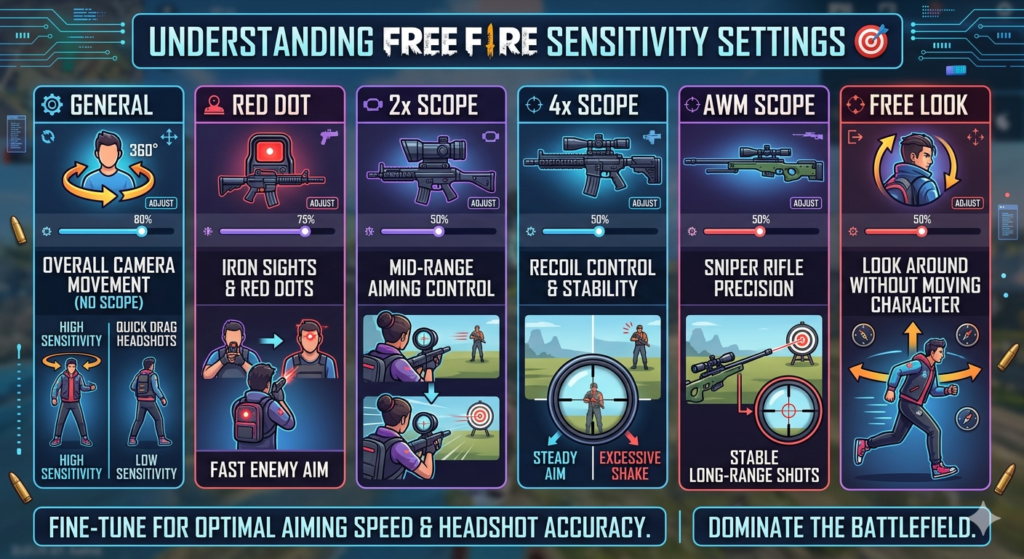
Main Sensitivity Options in Free Fire
General
The General sensitivity controls the overall camera movement when you move your screen without using any scope. A higher general sensitivity helps you turn quickly and perform fast drag headshots during close-range fights.
Red Dot
This setting affects the sensitivity when using red dot sights or iron sights. Players often keep this value high to make it easier to quickly drag the crosshair to the enemy’s head.
2x Scope
The 2x scope sensitivity controls camera movement when using weapons equipped with a 2x scope. Balanced sensitivity here helps maintain accurate mid-range aiming.
4x Scope
This sensitivity affects weapons that use a 4x scope such as assault rifles. It usually needs slightly lower sensitivity to maintain better recoil control and aim stability.
AWM Scope
The AWM scope sensitivity is mainly used for sniper rifles. Lower sensitivity helps players make precise long-range shots without shaking the aim.
Free Look
Free Look sensitivity controls how quickly you can look around the map without moving your character. This helps players check surroundings while running or gliding.
Adjusting these settings correctly can greatly improve your aiming speed and headshot accuracy in Garena Free Fire. 🎯
Best Free Fire Sensitivity Settings (2026)
The best sensitivity settings in Garena Free Fire help players aim faster, control recoil and hit more consistent headshots. In 2026, many players prefer high general sensitivity with slightly lower scope sensitivity to maintain both speed and accuracy.
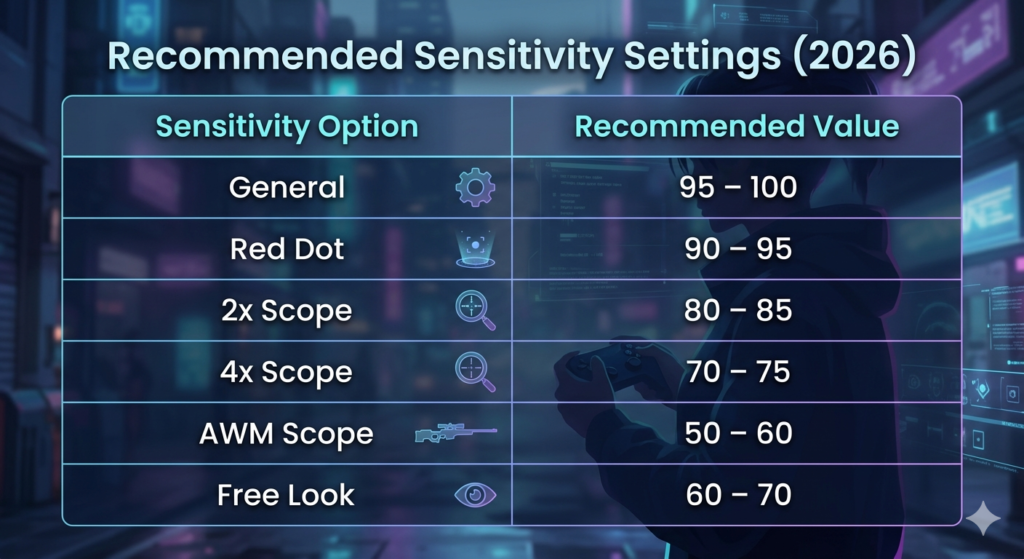
Recommended Sensitivity Settings (2026)
| Sensitivity Option | Recommended Value | Importance |
|---|---|---|
| General | 95 – 100 | Controls overall screen movement. Higher values help players quickly drag the aim to the enemy’s head for fast headshots. |
| Red Dot | 90 – 95 | Used for close-range fights with ARs and SMGs. High sensitivity helps in quick headshot drag shots. |
| 2x Scope | 80 – 85 | Useful for medium-range fights. Balanced sensitivity helps control recoil and track moving enemies. |
| 4x Scope | 70 – 75 | Often used with ARs like M4A1 or SCAR. Slightly lower sensitivity provides better aim stability. |
| AWM Scope | 50 – 60 | Important for sniper rifles. Lower sensitivity prevents over-aiming when targeting enemies at long distances. |
| Free Look | 60 – 70 | Allows players to look around without moving the character. Helpful for spotting enemies while running or looting. |
These settings provide a good balance between speed and accuracy in Garena Free Fire, helping players react quickly and land more headshots during fights.
Free Fire Sensitivity Settings for 8GB RAM Android 📱
Players using 8GB RAM devices can run Garena Free Fire smoothly with higher sensitivity. High-performance phones allow faster screen response, which helps in quick aim adjustments and better headshot accuracy.
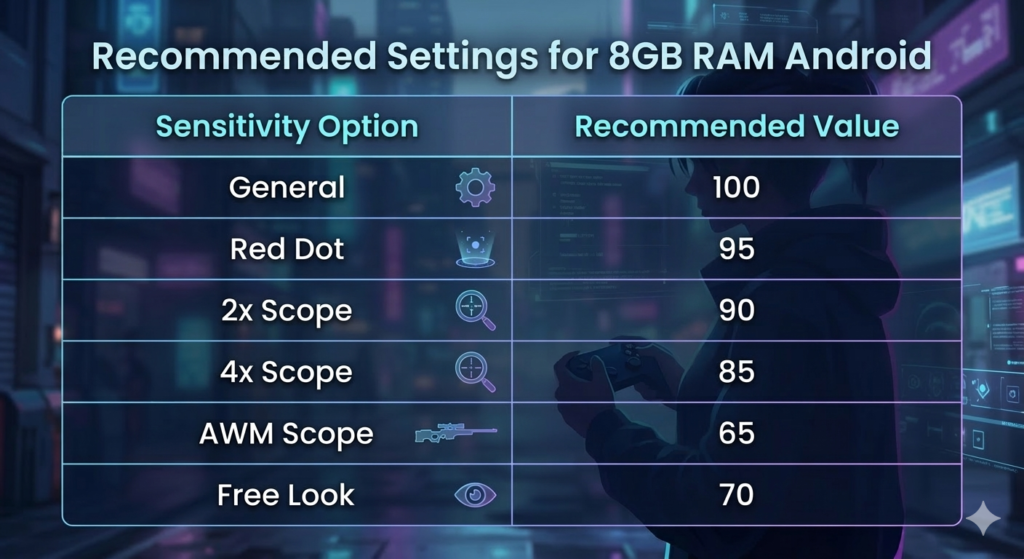
Recommended Settings for 8GB RAM Android
| Sensitivity Option | Value | Importance |
|---|---|---|
| General | 100 | Fast screen movement |
| Red Dot | 95 | Quick close fights |
| 2x Scope | 90 | Smooth mid-range aim |
| 4x Scope | 85 | Better recoil control |
| AWM Scope | 65 | Stable sniper shots |
| Free Look | 70 | Easy enemy checking |
These settings help players take advantage of the smooth performance and higher FPS on powerful Android devices.
Free Fire Gyroscope Sensitivity Settings 🔄
The gyroscope feature in Garena Free Fire allows players to control aim by tilting their phone. Many pro players use a gyroscope because it helps with faster and smoother headshot movements.
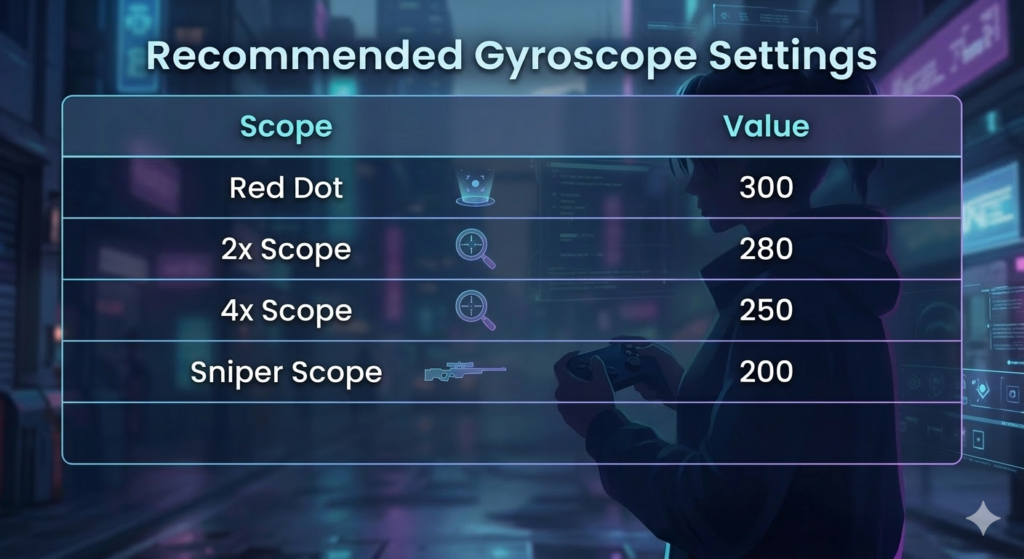
Recommended Gyroscope Settings
| Scope | Value | Importance |
|---|---|---|
| Red Dot | 300 | Fast headshot drag |
| 2x Scope | 280 | Better aim tracking |
| 4x Scope | 250 | Stable mid-range aim |
| Sniper Scope | 200 | Controlled long shots |
Using a gyroscope can improve aim precision and recoil control, especially in intense close fights.
Free Fire OB48 Sensitivity Settings ⚙️
After the OB48 update in Garena Free Fire, many players adjusted their sensitivity to maintain stable aiming and faster reactions during fights.
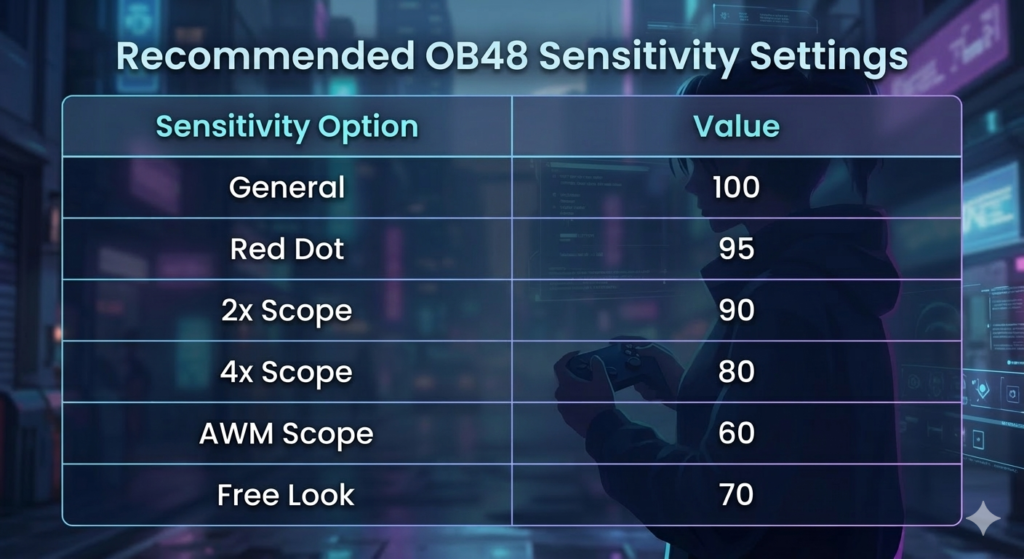
Recommended OB48 Sensitivity Settings
| Sensitivity Option | Value | Importance |
|---|---|---|
| General | 100 | Faster aim movement |
| Red Dot | 95 | Quick close combat |
| 2x Scope | 90 | Smooth medium fights |
| 4x Scope | 80 | Stable long aim |
| AWM Scope | 60 | Accurate sniper shots |
| Free Look | 70 | Better map awareness |
These settings help maintain fast aim speed and good accuracy after the OB48 update changes.
Free Fire Sensitivity Settings for Low-End Devices
Low-end phones may experience lag and slower touch response, so balanced sensitivity settings are important for smoother aiming. Keeping sensitivity slightly high helps improve drag headshots while maintaining control.
Recommended Settings:
| Setting | Value |
|---|---|
| General | 90 – 100 |
| Red Dot | 85 – 95 |
| 2x Scope | 80 – 90 |
| 4x Scope | 70 – 80 |
| Sniper Scope | 60 – 70 |
| Free Look | 60 – 70 |
For better performance, use Smooth graphics, close background apps and practice in the training ground to adjust the sensitivity according to your playstyle.
Free Fire Sensitivity Settings for High-End Devices
High-end devices provide smoother gameplay and faster touch response, allowing players to use higher sensitivity for quick aiming and faster headshots.
Recommended Settings:
| Setting | Value |
|---|---|
| General | 95 – 100 |
| Red Dot | 90 – 100 |
| 2x Scope | 85 – 95 |
| 4x Scope | 80 – 90 |
| Sniper Scope | 65 – 75 |
| Free Look | 70 – 80 |
These settings help players react faster in fights and perform smoother drag headshots. Enabling gyroscope can further improve aiming accuracy on high-end devices.
Free Fire Pro Player Sensitivity Settings
Many professional players use customized sensitivity settings to achieve faster aim and accurate headshots in Garena Free Fire. While copying pro settings can help, you may need to adjust them based on your device and play style.
Example Pro Player Sensitivity
Raistar Style Settings
| Setting | Value |
|---|---|
| General | 100 |
| Red Dot | 90 |
| 2x Scope | 85 |
| 4x Scope | 75 |
| AWM Scope | 50 |
| Free Look | 60 |
SK Sabir Boss Style Settings
| Setting | Value |
|---|---|
| General | 95 |
| Red Dot | 90 |
| 2x Scope | 85 |
| 4x Scope | 80 |
| AWM Scope | 60 |
| Free Look | 70 |
Tip: Always test sensitivity in training mode in Garena Free Fire and adjust it according to your device for the best results. 🎯
Free Fire Maximum Sensitivity Value
In Garena Free Fire sensitivity settings determine how quickly your aim moves when you swipe on the screen. Each sensitivity option has a maximum value of 100 which allows players to achieve the fastest possible aim movement.
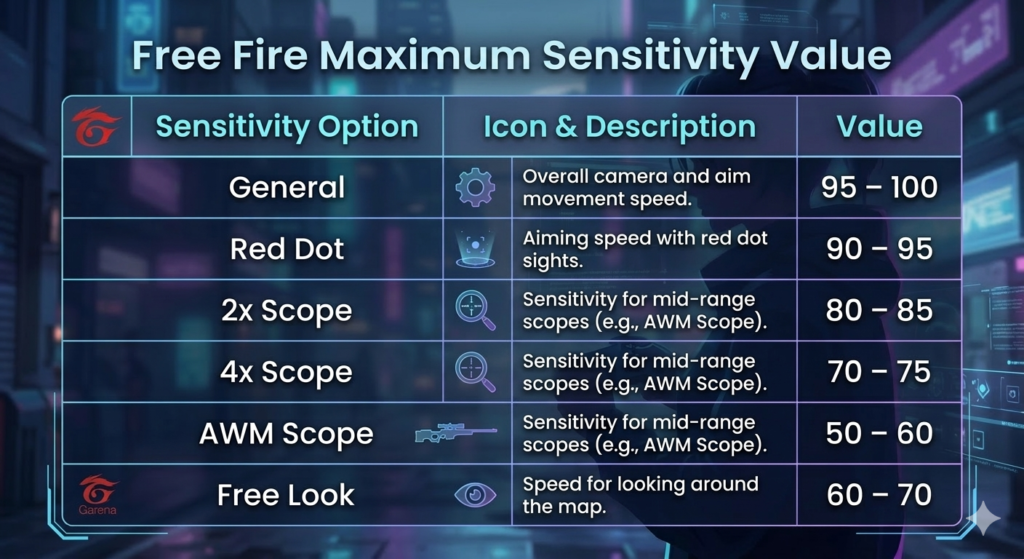
Sensitivity Options with Maximum Value
The following settings in the Free Fire sensitivity menu can be increased up to 100:
General – Controls overall camera and aim movement speed.
Red Dot – Affects aiming speed when using red dot sights.
2x Scope – Adjusts sensitivity for 2x scope weapons.
4x Scope – Controls aim movement for mid-range scopes.
AWM Scope – Used for sniper scope sensitivity.
Free Look – Determines how fast you can look around the map.
Is Maximum Sensitivity Good?
Using high or maximum sensitivity can help players react faster during fights. It is especially useful for close-range battles and performing drag headshots. However, setting everything to 100 may make your aim unstable if you are not used to it.
Many experienced players prefer a balanced sensitivity setup, where some settings are high while others are slightly lower for better accuracy.
Tip for Best Results
Before using maximum sensitivity in ranked matches, test your settings in the Training Ground of Garena Free Fire. Adjust the values gradually until you find the sensitivity that gives you both fast reactions and stable aim. 🎮
Tips to Improve Sensitivity Control in Garena Free Fire 🎯
Even the best sensitivity settings won’t help if you can’t control them properly. Here are some key tips to improve your aim and headshot accuracy:
- Adjust sensitivity gradually: Make small changes (5–10 points) instead of big jumps. This helps your muscle memory adapt smoothly.
- Practice in Training Ground: Spend time testing different weapons and scopes to see what feels most comfortable.
- Use the drag headshot technique: Aim at the enemy’s body and drag slightly upward to hit headshots quickly.
- Match sensitivity with your device: High-end phones can handle higher sensitivity, while low-end devices may need lower settings for stability.
- Keep your screen clean: Dirt or sweat can reduce precision, so a clean screen ensures smoother aiming.
- Stay consistent: Once you find your ideal sensitivity, stick to it to build muscle memory and control recoil.
- Practice daily: Even 10–15 minutes in training mode can improve reaction time and overall aim.
Pro Tip: Combining the right sensitivity with regular practice is the key to landing more headshots and dominating in Garena Free Fire. 🎮
Conclusion:
Choosing the right Garena Free Fire sensitivity settings can make a huge difference in your gameplay. Proper sensitivity improves aiming, headshot accuracy, and overall control, whether you are using scopes, gyroscope, or standard controls. Start with recommended values and adjust slowly to match your comfort.
Even pro player settings are only a reference- your personal feel is most important. Practice regularly in the training area or classic matches, and you’ll notice faster reactions, smoother aim, and more headshots. With the 2026 settings guide, you are ready to elevate your Free Fire skills.
Read More Blogs on freefirestylecode.com, and also follow Whatsapp channel for the latest updates.